Street Simulator is a large real-time 3D city demonstration built with the CNA framework.
It represents a continental-European inner-city crossroads with buildings, shops, moving traffic, pedestrians, street furniture, vegetation, physically based materials, an analytic sky, local reflection probes and spatial audio.
Play Street Simulator online: https://play.libcna.com/street-simulator/street-simulator.html
GitHub: https://github.com/libcnalab/street-simulator
YouTube Video: https://www.youtube.com/watch?v=hWiBU46D6h8
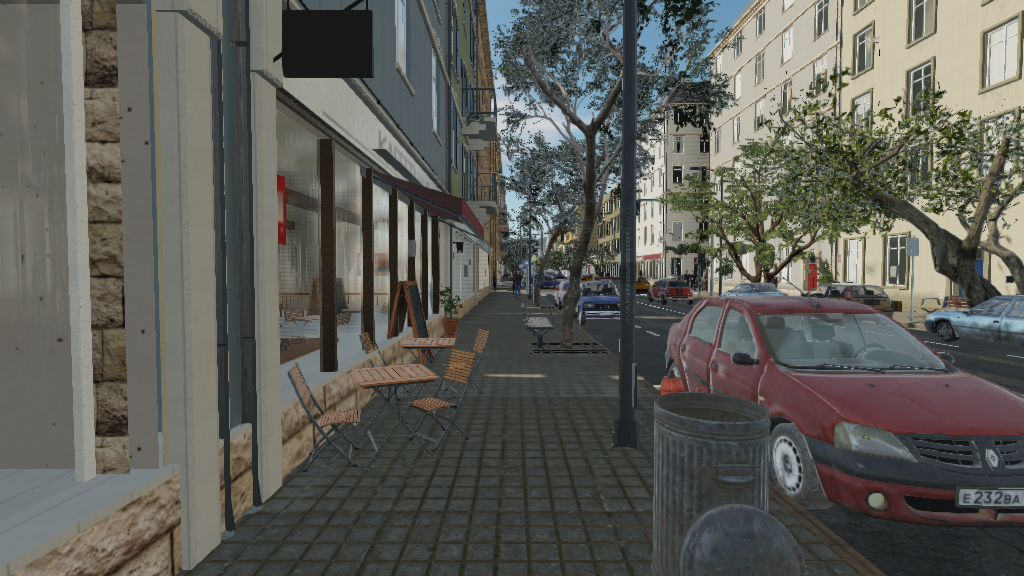
Street Simulator is designed as a substantial real-world workload for CNA rather than a small isolated graphics sample. It combines rendering, content loading, procedural generation, animation, simulation, audio and WebAssembly inside one C++ application.
A living city street
The central scene is a four-arm signalised junction surrounded by dense urban development.
It contains:
- roads and pavements
- zebra crossings
- traffic lights
- parking spaces
- shops
- apartment buildings
- street furniture
- trees
- parked cars
- moving traffic
- pedestrians
- signs
- bicycles
- bus shelter
- distant city blocks
The street is not a static architectural model.
Traffic moves through the junction and reacts to signals and other vehicles. Pedestrians follow the pavements, wait at crossings and cross according to the pedestrian signals.
The result is a small simulated urban environment that can be explored freely.
Procedural city generation
Much of Street Simulator is generated directly by C++ code from a deterministic seed.
Generated content includes large parts of the:
street geometry
building layout
facades
windows
shop fronts
road markings
street furniture
materials
traffic layout
signage
The street uses dimensions based on real-world measurements rather than arbitrary visual proportions.
Road widths, parking spaces, pavements, storeys, windows and many smaller architectural details are therefore designed in metres and kept at consistent scale throughout the scene.
Buildings and shops
Buildings contain considerably more geometry than simple textured boxes.
Their facades include features such as:
recessed windows
frames and mullions
sills
doors
balconies
cornices
gutters
downpipes
awnings
shop fronts
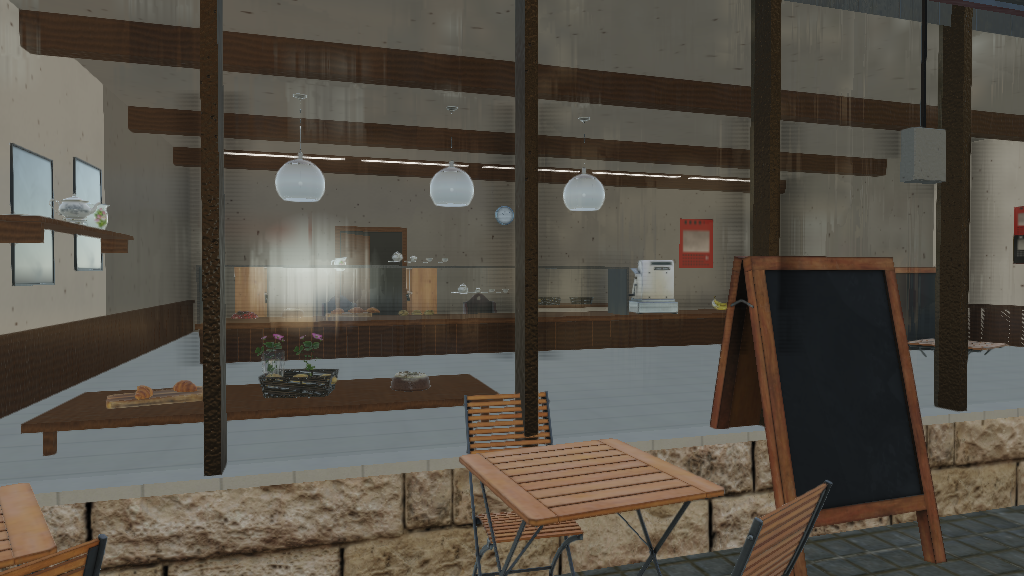
Many ground-floor shops also contain generated interiors.
Depending on the shop, a window can reveal shelves, counters, products, posters, tables, lighting and other furniture rather than a flat texture behind the glass.
One of the more detailed interiors is a bakery-cafe with its own counter, display case, bread shelving, tables, fittings and decorative details.
A larger city around the crossroads
The highest detail is concentrated around the area the player can inspect closely.
Farther from the main junction, the scene uses progressively cheaper geometry and distance-based culling. This allows the city to continue beyond the immediate crossroads without giving distant objects the same cost as objects directly beside the camera.
Repeated objects such as street furniture and vegetation can also be drawn using GPU instancing when the selected CNA renderer supports it.
Rendering with CNA
Street Simulator uses CNA's 3D graphics APIs directly.
The application's rendering code is organised around components such as:
SceneRenderer
SkySystem
EnvironmentBaker
MaterialLibrary
GpuMesh
InstancedMesh
SkinnedGpuMesh
CNA provides the graphics primitives used underneath them, including:
PbrEffect
SkinnedPbrEffect
ImageBasedLightEXT
ShaderEffect
TextureTransformEXT
The renderer handles static geometry, moving vehicles, skinned characters, transparent surfaces, material application, visibility testing and instanced batches.
Its feature set includes:
physically based materials
image-based lighting
local reflection probes
analytic sky and clouds
distance fog
hardware instancing
GPU skinning
frustum culling
distance culling
level-of-detail selection
sRGB output
Street Simulator can also report limitations of the selected renderer at runtime. For example, repeated geometry can fall back to ordinary draws when hardware instancing is unavailable.
Physically based materials
The street uses CNA's PbrEffect material model.
Materials can provide:
base colour
normal map
roughness
metalness
occlusion
emissive contribution
alpha mode
double-sided state
texture transforms
The same material system is used for generated geometry and imported models.
Sky and image-based lighting
Street Simulator contains its own SkySystem built on CNA's shader APIs.
The sky responds to the configured sun elevation and azimuth and includes atmospheric colouring and procedural clouds.
It is also used as a lighting source.
Street Simulator generates the image-based-lighting data needed by PbrEffect, including irradiance and prefiltered environment data. The same environment therefore influences both the visible sky and the appearance of PBR surfaces.
The sun can be moved interactively, making it possible to inspect the scene under different lighting directions without rebuilding it.
Local reflection probes
A single sky environment cannot describe everything reflected by objects inside a street canyon.
Street Simulator therefore places local reflection probes through the environment.
During scene construction, the static street is captured into cube maps from a number of positions. EnvironmentBaker then prepares those captures for image-based lighting.
Nearby surfaces can use the local probe instead of only the global sky environment.
This allows a car to respond to the facade beside it and a shop window to respond to the street in front of it.
glTF and the CNA content pipeline
External models use CNA's own glTF content path.
Source .glb files are compiled by CNA's content tools and can be loaded at runtime through:
ContentManager::Load<Model>()The resulting model parts are translated into Street Simulator's material representation and drawn by the same renderer as the generated city geometry.
The pipeline is therefore:
glTF / GLB
    │
    ▼
CNA content tools
    │
    ▼
CNB
    │
    ▼
ContentManager
    │
    ▼
Model
    │
    ▼
Street Simulator
Street Simulator also exercises imported skinning data, skeletons and animation clips through CNA's model and animation APIs.
Generated and external assets
The application does not require the optional external asset collection in order to run.
Procedural versions are available for the basic scene, while optional downloaded assets add higher-detail models and scanned surfaces.
The external manifest currently covers models, PBR surfaces, character assets and sound samples. Their sources, licences and checksums are recorded in the repository.
External content includes items such as:
vehicles
trees
hydrants
benches
planters
cafe furniture
covered car
shop-window objects
building details
scanned road and facade surfaces
Cars and traffic
The scene contains parked and moving vehicles.
Traffic follows defined lanes through the crossroads and interacts with the traffic-signal system.
Authored vehicle models can contain separate wheels whose rotation and orientation are handled independently. Street Simulator also accounts for the actual axle orientation found in imported models rather than assuming that every wheel was authored around exactly the same local axis.
Moving vehicles can include drivers rendered through the same skinned-character path used by pedestrians.
The simulation and rendering systems remain separate: the traffic system determines where a vehicle is, while the scene converts that state into the geometry submitted for rendering.
Pedestrians
Pedestrians populate the pavements and crossing routes around the junction.
They can:
follow pavement routes
walk at different speeds
turn corners
wait at crossings
cross when allowed
play walking and idle animations
Characters use a skeleton and animation clips and are rendered through CNA's SkinnedPbrEffect path.
Street Simulator can use its generated characters and also supports character data originating from the content pipeline.
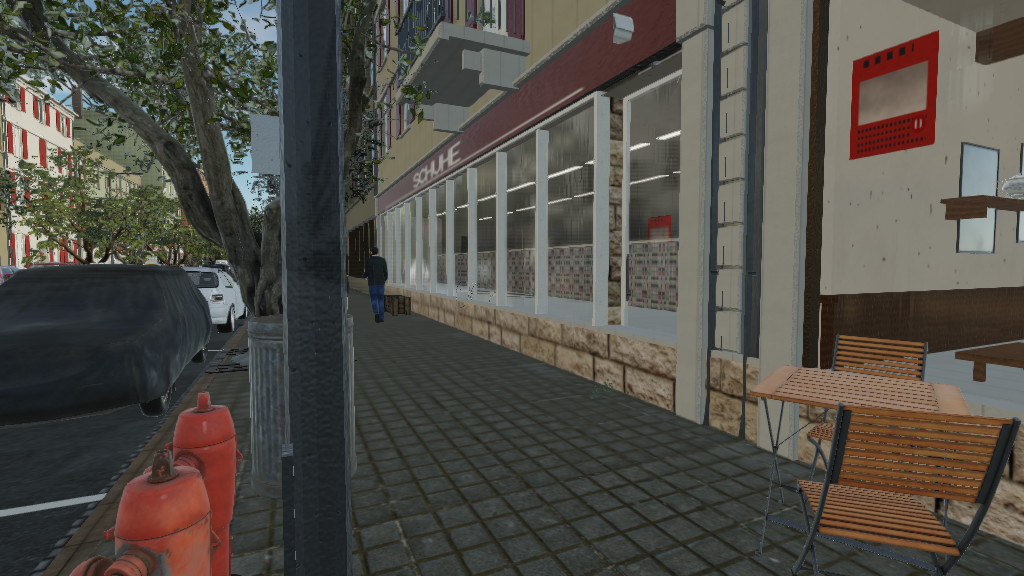
Street-level detail
The city contains many smaller objects that are easy to omit from a conventional graphics demonstration but important when the camera is allowed to walk through the scene.
Examples include:
bollards
bins
hydrants
bicycle stands
planters
benches
bus shelter
traffic signs
street-name signs
house numbers
cafe tables
deliveries
security cameras
air-conditioning units
These objects help give the environment the density expected from a real street.
Spatial audio
Street Simulator also exercises CNA's XNA-style audio implementation.
Its soundscape can include:
vehicle engines
footsteps
voices
birds
wind
other street sounds
Many sounds are positioned in 3D relative to the camera.
Vehicle engines follow their vehicles, footsteps follow the player while walking and bird ambience is placed around nearby trees. Wind is treated as non-positional ambience.
Day and night
The position of the sun controls the lighting environment.
Street Simulator can also be started with:
--nightwhich places the scene at civil twilight.
At low sun elevations the city activates its night lighting, including street lamps and illuminated building elements.
Walking through the street
Street Simulator supports flying, walking and cinematic camera modes.
| Control | Action |
|---|---|
| W A S D | Move |
| Mouse | Look around |
| Arrow keys | Look around without a mouse |
| Q / E | Move down / up while flying |
| Shift | Move faster |
| Ctrl | Move slower |
| Mouse wheel | Change movement speed |
| Tab | Switch between walking and flying |
| C | Toggle cinematic camera |
| 1–8 | Jump to saved viewpoints |
| R | Return to the starting viewpoint |
| F1 | Toggle diagnostics |
| F5 | Toggle fog |
| F6 | Toggle clouds |
| F9 | Save a screenshot |
| [ / ] | Change sun azimuth |
| - / = | Change sun elevation |
| Esc | Release captured mouse |
Walking mode keeps the camera on the ground and applies collision against buildings, vehicles and other obstacles rather than allowing the viewer to pass through them.
Diagnostics and performance
The F1 diagnostics overlay exposes the current renderer and useful performance information.
It includes:
FPS and frame time
culling time
sky time
opaque rendering time
transparent rendering time
draw calls
instanced draw calls
triangle count
visible batches
visible instances
camera position and direction
sun position
exposure
scene geometry size
texture count and memory
scene build time
Street Simulator also contains fixed benchmark viewpoints and command-line benchmark support.
Testing Street Simulator
The repository contains a dedicated C++ test suite covering areas such as:
city layout
geometry
camera behaviour
pedestrians
traffic
traffic signals
appearance
settings
content pipeline
character formats
benchmarks
realism checks
The normal test suite can be run through CTest.
Street Simulator also maintains eighteen fixed reference screenshots. Its screenshot workflow renders the same viewpoints and compares them against those references, making large visual changes easier to detect.
The reference images are stored in:
https://github.com/libcnalab/street-simulator/tree/develop/docs/screenshots
Street Simulator in the browser
Street Simulator can also be built for the web with Emscripten and WebAssembly.
The browser build uses CNA's WEBGL2 renderer and can be played directly at:
https://play.libcna.com/street-simulator/street-simulator.html
The complete compiled content collection is intentionally not embedded in the web package because it is very large.
Instead, the browser package contains the application configuration and Street Simulator generates the surfaces it needs at startup. Optional imported assets that depend on the external compiled content are replaced by the generated scene content.
More screenshots
Shop window
Street tree
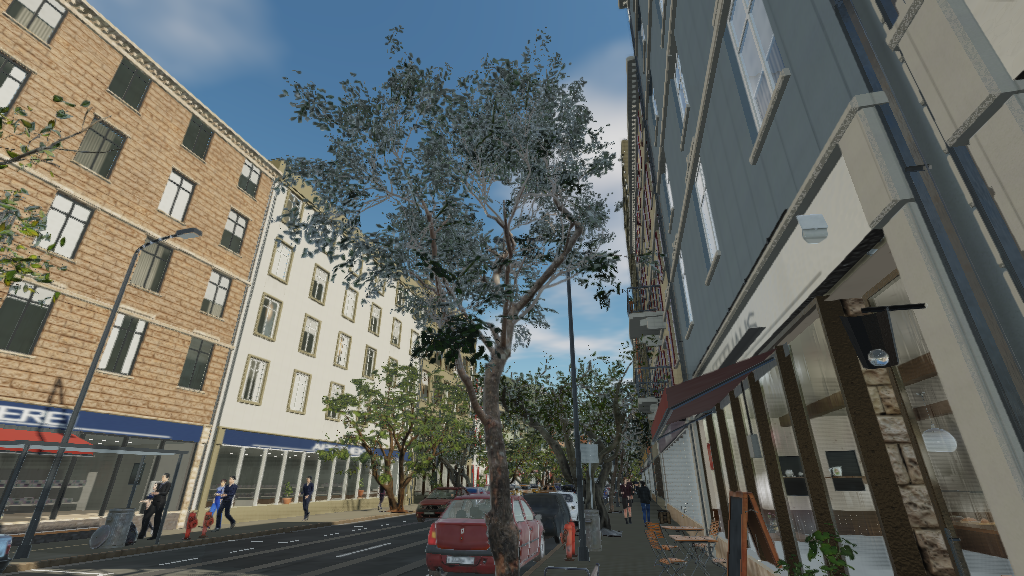
Corner to corner
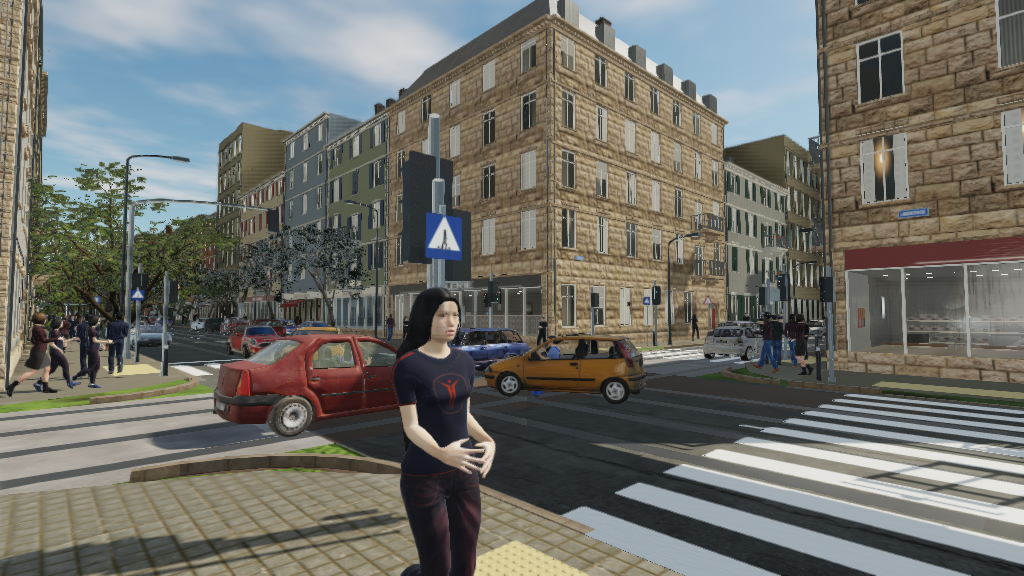
The repository contains eighteen canonical screenshots covering the scene from fixed viewpoints.
More than a visual demo
Street Simulator brings many CNA systems together in one application:
3D rendering
PBR materials
image-based lighting
reflection probes
glTF
CNB content
GPU skinning
instancing
procedural geometry
traffic simulation
pedestrian simulation
spatial audio
WebAssembly
That makes it useful not only as a city demonstration but also as an integration workload for CNA.
Small samples can verify individual APIs. Street Simulator tests what happens when a large number of those APIs are used together in a continuously running application.
Play Street Simulator
The easiest way to experience Street Simulator is directly in a browser:
Play online:
https://play.libcna.com/street-simulator/street-simulator.html
The complete source code is available on GitHub:
GitHub:
https://github.com/libcnalab/street-simulator
Street Simulator is a procedural city built with CNA: a single C++ application combining rendering, content, simulation, animation, audio and WebAssembly.