House Simulator: Exploring a Complete Virtual Home Built with CNA
House Simulator is one of the largest showcase applications built on CNA so far. Instead of demonstrating a single graphics feature or a small test scene, it creates an entire property that can be explored in first person: a large house, garage, gardens, street and surrounding neighbourhood.
The project is designed as an architectural and graphics showcase rather than a traditional game.
There is no score, no win condition and no life-simulation system. The goal is simply to create a convincing place that can be walked through and experienced while exercising a large part of CNA's XNA-compatible API.
Play online: https://play.libcna.com/house-simulator/index.html
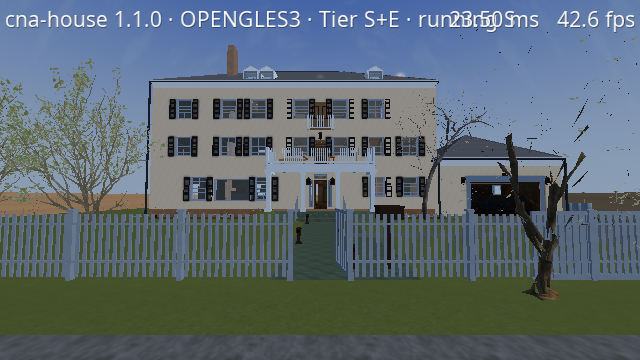
A Whole House to Explore
The house is much more than a few connected rooms. It contains a basement, ground floor, two upper floors and an attic, together with a garage and the exterior property.
The current world contains 96 spatial cells, 90 of which are accessible to the player. Rooms are furnished according to their purpose, and the project includes areas such as living rooms, bedrooms, bathrooms, offices, a kitchen, library, games room, workshop, gym and even a basement cinema.
Real staircases connect the floors, so exploring the building feels like moving through one continuous structure rather than loading a collection of unrelated scenes.
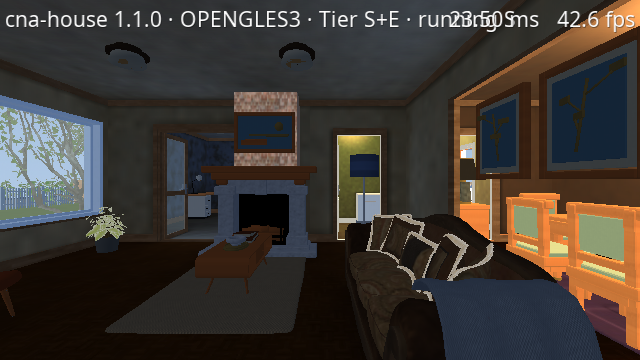
The amount of interior variety is important for CNA as well. A single renderer has to deal with many different combinations of geometry, furniture, textures, lighting conditions and viewing distances while keeping the same XNA-style application code.
Built on the XNA 4.0 API
One of the most interesting aspects of House Simulator is a restriction imposed on the project from the beginning: the runtime application is built exclusively on the XNA 4.0 API surface implemented by CNA.
The House Simulator source code does not directly use OpenGL, OpenGL ES, Vulkan, WebGPU, Direct3D or Metal. It also does not rely on CNA-specific graphics extensions to bypass limitations in the XNA API.
The project even builds with CNA's extension layer disabled.
That makes House Simulator useful as more than a visual demo. It is also a practical test of an important CNA goal: allowing substantial applications to be written against the familiar Microsoft.Xna.Framework programming model without requiring application code to know which graphics API ultimately renders the scene.
Where something cannot be obtained through the XNA API, House Simulator either implements the required behaviour inside its own application code or goes without it.
More Than a Static Architectural Model
The house is not frozen under one lighting setup. House Simulator contains a complete environmental system.
Time can advance automatically, with a default 24-minute day, or it can be selected manually. The sun moves through the sky, the moon changes according to the calendar, stars appear at night and the visual environment changes with the weather.
Clear weather, overcast conditions, rain and a snow state are supported. Rain is kept out of covered areas, wet surfaces react to weather, fog changes with atmospheric conditions and interior lighting follows its own schedule.
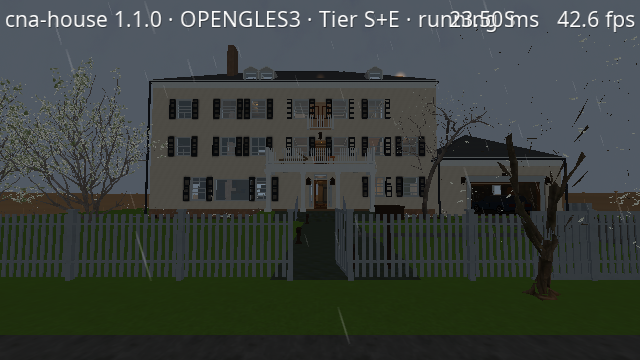
These systems are particularly useful for testing a renderer because the same property can be observed under radically different conditions without replacing the level.
A bright exterior scene, a dark basement, an artificially lit room and a rainy garden all exercise different parts of the rendering pipeline.
From the Basement Cinema to the Library
Some rooms receive considerably more detail than would be necessary for a basic graphics test. The intention is to make House Simulator feel like an actual property rather than a collection of benchmark scenes.
The basement, for example, includes its own cinema.
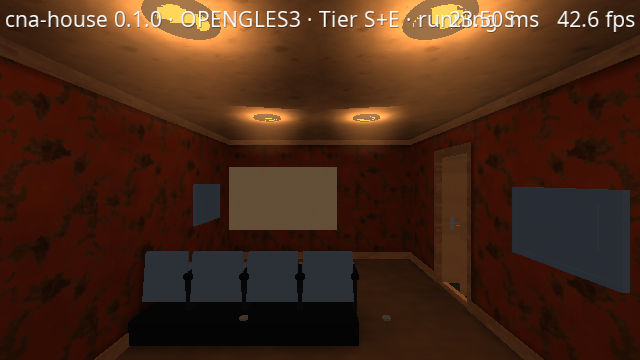
Higher in the house, rooms such as the library provide another combination of furniture, lighting, windows and interior materials.
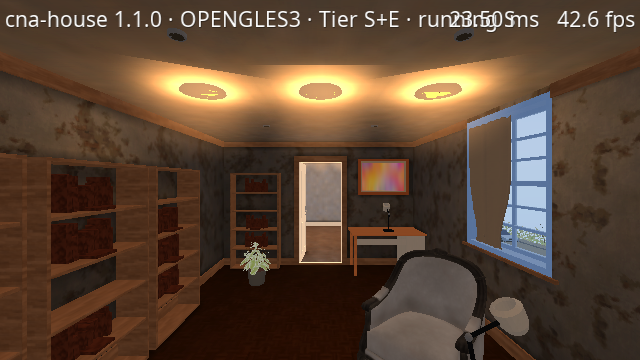
The environment is also accompanied by audio. House Simulator has footsteps for multiple surface categories, interior room tone, exterior daytime and nighttime ambience, rain and wind layers, and spatial differences between indoor and outdoor sound.
Linux, Web and Android
House Simulator 1.1.0 expanded the showcase from its original Linux desktop version to three targets:
Linux desktop, Web and Android.
The browser version runs as a WebGL 2 application produced through CNA's Web toolchain. The Android version uses the same game code with touch controls for movement, camera control and menus.
This is an important part of what the project demonstrates. The house itself is not rewritten for each platform. The same XNA-style application sits above CNA while the framework handles the platform and rendering differences underneath it.
The Web package is currently around 97 MB compressed, while the Android APK is around 100 MB. The Android release has been validated on a GPU-accelerated Android emulator; physical-phone validation remains a separate step.
A 41-Minute Tour of the Property
Because the property became so large, House Simulator also contains an automatic filming tour.
Pressing C on the desktop starts a predefined walk through the accessible parts of the property. The complete route takes approximately 41 minutes and covers the house and grounds without teleporting between locations.
The feature was originally intended to make systematic visual inspection and video recording easier, but it also illustrates the scale the project eventually reached. What began as a CNA graphics showcase now contains enough space for a guided tour approaching the length of a television episode.
What House Simulator Means for CNA
House Simulator is valuable to CNA precisely because it is not a tiny framework sample.
Small samples are excellent for proving that an individual API works. House Simulator asks a different question:
Can those APIs work together for a large application for an extended period of time?
It exercises content loading, models, textures, effects, input, audio, storage, UI, first-person movement, environmental simulation, rendering, platform integration and application lifecycle behaviour inside one project.
It also has unit tests, GPU integration tests, reference-image rendering tests and fixed performance scenarios. Visual reference images cover representative rooms during the day and night as well as different weather conditions.
The result is both a virtual house and a practical CNA stress test.
House Simulator shows the type of application CNA is intended to support: a substantial C++ program written using the XNA programming model, while CNA takes responsibility for running it across different modern platforms.
Project
Source code and additional screenshots are available on GitHub:
GitHub: https://github.com/libcnalab/house-simulator
Play online: https://play.libcna.com/house-simulator/index.html
YouTube video: https://www.youtube.com/watch?v=errSKcxLpeY
House Simulator is built with CNA — XNA 4.0 in C++ and sharp-runtime.
Learn more about CNA at: