MeshCraft is a C++23 3D scene editor and content-authoring toolkit built around its own editable MC3 scene format.
It belongs to the wider CNA ecosystem, but it is not part of CNA itself.
The project combines:
- a 3D editor
- the MC3 scene format
- reusable scene and asset libraries
- PBR materials
- CSG modeling
- animation
- command-line conversion tools
- glTF/GLB export
- the binary MCB format
- integration with CNA
GitHub: github.com/libcnalab/mesh-craft
Try online: https://play.libcna.com/mesh-craft/MeshCraft.html
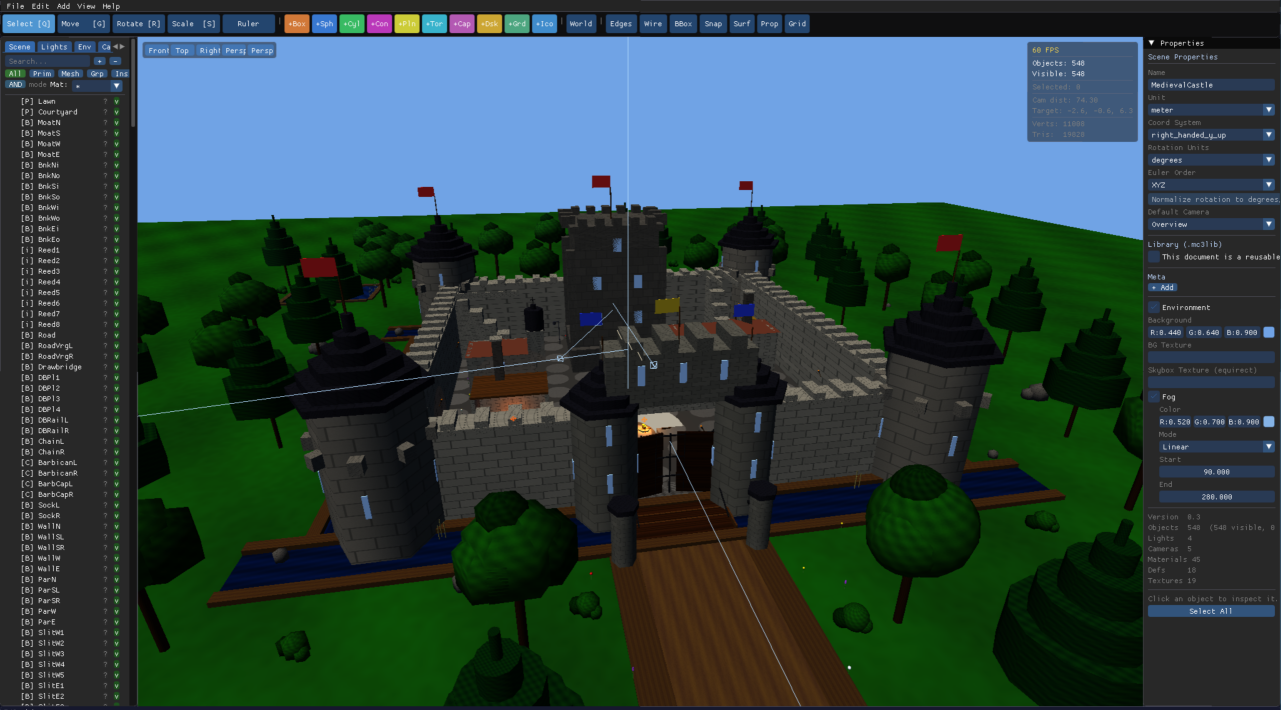
The main idea
Most real-time 3D formats eventually describe triangles.
MeshCraft instead wants its source files to preserve how a scene was constructed.
For example, instead of storing only the final mesh of a wall with a doorway, an MC3 document can retain the original boxes and the boolean operation that created the opening.
That makes the source scene editable.
The workflow can look like this:
MeshCraft
    ↓
.mc3.xml
    ↓
mc3togltf
    ↓
.gltf / .glb
    ↓
CNA content pipeline
    ↓
CNA application
MC3 is therefore primarily an authoring format.
glTF or another runtime-oriented representation can be generated later.
MC3: MeshCraft 3D
The native MeshCraft source format is called MC3, or MeshCraft 3D.
Files normally use:
scene.mc3.xmlMC3 is XML-based and describes a scene as structured, editable objects rather than only as baked geometry.
A document can contain things such as:
- primitives
- groups
- transforms
- materials
- textures
- lights
- cameras
- animations
- reusable definitions
- instances
- layers
- tags
- collision hints
- environment settings
- states and actions
The format also records information such as units, coordinate system, rotation units, and Euler rotation order.
The full specification lives directly in the repository:
MC3 Example (castle.mc3.xml)
<?xml version="1.0" encoding="UTF-8"?>
<mc3 version="0.3" model="MedievalCastle" unit="meter" rotation_units="degrees" euler_order="XYZ">

<environment>
<background color="0.47 0.65 0.88"/>
<fog mode="linear" color="0.72 0.80 0.92" start="130" end="320"/>
</environment>

<lights>
<ambient color="0.35 0.37 0.45" brightness="0.45"/>
<directional name="Sun" color="1.0 0.95 0.80" brightness="2.8"
direction="-0.55 -1.0 -0.45" cast_shadows="true"/>
<point name="LampCourt1" color="1.0 0.85 0.60" brightness="8" position=" 10 3.5 5" range="20"/>
<point name="LampCourt2" color="1.0 0.85 0.60" brightness="8" position="-10 3.5 -5" range="20"/>
<spot name="GateLight" color="0.95 0.90 0.70" brightness="12"
position="0 8 30" direction="0 -0.8 -1" angle="35" falloff="50" range="28"/>
</lights>

<cameras>
<camera name="Main" type="perspective" position=" 60 30 65" target=" 0 10 -5" fov="55" near="0.1" far="500"/>
...</cameras>

<materials>
<material id="stone" roughness="0.85" metallic="0.0">
<base_color>0.70 0.65 0.58 1.0</base_color>
</material>
...</materials>

<definitions>

<definition id="corner_tower">
<group name="CTower">
<cylinder name="TBody" radius="4.5" height="14" segments="24" position="0 7.0 0" material="stone"/>
<cylinder name="TParapet" radius="4.8" height="0.8" segments="24" position="0 14.4 0" material="dark_stone"/>
<box name="TM0" size="1.3 1.6 1.3" position=" 4.00 15.2 0.00" material="stone"/>...
<cone name="TRoof" radius="5.2" height="6.5" segments="24" position="0 19.25 0" material="roof_tile"/>
</group>
</definition>..

</definitions>

<objects>

<plane name="Ground" size="300 300" axis="y" position="0 0.00 0" material="grass"/>
<plane name="MoatWater" size=" 68 68" axis="y" position="0 0.05 0" material="moat_water"/>
<plane name="Courtyard" size=" 44 44" axis="y" position="0 0.10 0" material="dirt"/>

..<box name="Road" size="5.2 0.06 60" position="0 0.12 62" material="dirt"/>

</objects>

<actions>
<action name="WaveFlagNW" duration="3.2" loop="true">
<channel target="FlagNW" property="rotation.y">
<keyframe time="0.0" value=" 0.0" interp="cubic"/>
<keyframe time="1.6" value="12.0" interp="cubic"/>
<keyframe time="3.2" value=" 0.0" interp="cubic"/>
</channel>...
</action>...

</actions>

</mc3>
Primitive modeling
MeshCraft can construct scenes from common geometric primitives.
Current MC3 primitives include:
- box
- sphere
- cylinder
- cone
- plane
- torus
- capsule
- disk
- grid
- icosphere
Objects have ordinary hierarchical transforms:
position
rotation
scale
pivot
Objects can also be placed into groups so that more complicated models can be assembled from smaller components.
This makes MC3 suitable for procedural and construction-oriented assets where keeping the original object hierarchy is useful.
CSG
MeshCraft also supports Constructive Solid Geometry, or CSG.
Objects can participate in boolean operations such as:
- union
- difference
- intersection
The implementation uses the Manifold library.
For example, a simple building could begin as a box:
Buildingand then subtract other boxes:
Building
 - Door opening
 - Window opening
 - Window opening
 - Window opening
The resulting geometry can eventually be exported as an ordinary mesh, while the MC3 source still describes the construction used to create it.
Extrusion along paths
MC3 can also describe extrusion along several types of paths, including:
- lines
- arcs
- helices
- polylines
- Bézier paths
This allows more complex geometry to be constructed without manually defining all of its triangles.
It can be useful for things such as pipes, rails, architectural details, cables, curved structures, or other repeated profiles.
PBR materials
MeshCraft is not limited to simple vertex colors.
Its material system supports modern PBR properties including:
- base color
- metallic
- roughness
- emissive
- normal textures
- occlusion textures
That makes it possible to author assets intended for CNA's more advanced rendering paths as well as for export to glTF-compatible tools.
Reusable definitions and instances
MC3 supports reusable object definitions.
Instead of duplicating complete geometry every time an object appears, a scene can define something once and instantiate it repeatedly.
Conceptually:
Definition: StreetLamp
        ↓
     Instance
     Instance
     Instance
     Instance
This is useful for scenes containing repeated objects such as:
- windows
- doors
- lamps
- furniture
- trees
- props
- architectural modules
MC3 also supports reusable libraries and imports between documents.
A library can declare its own namespace and version, and another scene can import definitions from it.
This moves MeshCraft beyond a simple single-file model format toward a reusable asset-authoring system.
Includes and asset libraries
MC3 files can also include definitions, materials, and textures from other MC3 files.
For example:
<include file="furniture.mc3.xml"/>
<include file="materials.mc3.xml"/>
A scene can then reuse those assets without copying their definitions into every file.
Local definitions can override imported ones where appropriate.
The loader also handles nested includes, prevents cycles, and preserves the include structure when files are saved again.
This matters once an asset collection grows beyond a few isolated models.
Animation
MeshCraft includes animation support as part of the source format.
Animation channels can affect properties such as:
- position
- rotation
- scale
- visibility
- material color
- deformation
The editor provides a timeline and supports keyframes with different interpolation modes.
This means MC3 is not limited to static architectural modeling.
However, MeshCraft should not be confused with a complete character-animation package such as Blender. More specialized workflows such as complex skeletal character authoring may still be better performed in dedicated DCC software and brought into the CNA ecosystem through glTF.
Cameras, lights and environment
An MC3 scene can also describe scene-level information rather than only meshes.
This includes:
- cameras
- lights
- fog
- background/environment configuration
MC3 understands both Y-up and Z-up coordinate systems and preserves the authored coordinate convention.
The editor, exporter, picking system, gizmos, cameras, lights and other systems consistently transform the scene into the appropriate working coordinate space.
The MeshCraft editor
The MeshCraft executable provides the interactive editor.
Its current features include:
- 3D viewport
- orbit camera
- object hierarchy
- object selection
- multi-selection
- transform gizmos
- local/world transforms
- property editing
- material editing
- CSG operations
- extrusion
- animation timeline
- layers and tags
- collision hints
- LOD definitions
- environment editing
- first-person walk mode
- undo/redo
- autosave
- glTF/GLB export
The UI uses Dear ImGui, but the editor's rendering path goes through CNA rather than directly building the application around native OpenGL calls.
That makes MeshCraft itself another substantial consumer of CNA.
MeshCraft is modular
The project is not one giant editor executable.
Its main architecture is divided into several components.
mc3
The core MC3 library.
It contains the Mc3Document data model and XML parsing/writing.
Importantly, this layer has no graphics dependency.
An application can therefore manipulate MC3 documents without initializing CNA or creating a graphics device.
mcb
Support for the binary MCB format.
This provides a more compact binary representation for cases where parsing the editable XML source format is not desirable.
mc3togltf
A command-line converter:
.mc3.xml → .gltf / .glbThis is one of the most important tools for CNA integration.
mc3tomcb
A converter between editable MC3 and the binary MCB representation.
MeshCraft
The interactive graphical editor.
Only the editor needs the complete graphics and UI environment.
glTF and GLB export
MeshCraft can export scenes to glTF or binary GLB.
For example:
mc3togltf scene.mc3.xml scene.glbThis provides a clean boundary between authoring and runtime content.
The editable source can remain:
building.mc3.xmlwhile a generated runtime asset becomes:
building.glbCNA can then process the glTF/GLB asset through its own content pipeline.
This is already being used experimentally by CNA projects.
For example, the Iron Gang project in CNA Lab has a content path resembling:
MC3
 ↓
MeshCraft
 ↓
GLB
 ↓
CNA glTF conversion
 ↓
CNJ
 ↓
ContentManager
 ↓
CNA game
That allows a game to use a CNA-oriented runtime format without making CNJ the editable source format.
Why not author everything directly in glTF?
glTF is excellent as an interchange and runtime-delivery format.
But that is a different problem from preserving the original constructive scene.
After a boolean operation or procedural construction has been baked to triangles, much of the information needed to conveniently edit that construction may be gone.
MeshCraft therefore treats the formats differently:
MC3
authoring / editable source

        ↓ export

glTF / GLB
interchange

        ↓ processing

CNA runtime content
The distinction is similar to keeping an editable project file instead of treating the final exported asset as the only source.
MCB is not CNB
There are several similarly named formats in the wider CNA ecosystem, so the distinction is useful.
MCB belongs to MeshCraft and is a binary representation related to MC3.
CNA also has its own content formats and content-pipeline concepts.
They solve different problems.
MeshCraft remains responsible for authoring its scene representation, while CNA remains responsible for the application's runtime content system.
CNA is a dependency, not the purpose of MC3
The editor uses CNA, but the MC3 format and tooling are designed to remain separable from it.
For example:
mc3
mcb
mc3togltf
mc3tomcb
can perform useful work without needing the complete graphical editor.
This separation is intentional.
A file-format library should not require a GPU simply because an editor for the same format happens to have a 3D viewport.
More than a model editor
The long-term interesting part of MeshCraft is that it sits between a simple mesh editor and a complete world-authoring system.
MC3 already has concepts for:
geometry
materials
hierarchy
instances
libraries
animation
lights
cameras
environment
collision hints
states
actions
That gives the format room to describe much more than one isolated triangle mesh.
At the same time, MeshCraft does not need to become another general-purpose Blender.
Its strongest role in the CNA ecosystem is likely to remain more focused:
a lightweight, structured authoring environment whose output can flow cleanly into CNA applications.
MeshCraft and CNA
The relationship can be summarized like this:
MeshCraft
    │
    │ authors
    ▼
MC3 source scene
    │
    │ exports
    ▼
glTF / GLB
    │
    │ CNA content tools
    ▼
CNA runtime content
    │
    ▼
CNA application
CNA handles the runtime framework.
MeshCraft handles 3D authoring.
MC3 preserves the editable source.
glTF provides the interchange boundary.
That division keeps the projects independent while still giving them a useful workflow together.
An authoring layer for the CNA ecosystem
MeshCraft started as a 3D editor, but it is increasingly better described as an authoring toolchain.
The editor is one part.
MC3 is another.
The libraries and converters are another.
Together they provide a path from structured editable scenes to assets that can eventually be consumed by games and applications built on CNA.
That is the role MeshCraft can play in the wider ecosystem:
CNA provides the runtime. MeshCraft helps create the worlds and assets that run on it.